Archive for the 'software' Category

Demon – A Debugger for the 16 bit 6809 CPU

Sunday, November 13th, 2022

Just a quick post. Way back in time I did development work using the Z80 CPU from Zilog. It was good but I always wanted to play with the Hot New Hardware of then time: the Motorola 6809 processor. Flash forward about 40 years (yikes!) and I found Grant’s Six Chip Computer, the 6809 edition. A quick $40 or so order to AliExpress and I had all 6 parts I needed to build one, which I did.

Assembled G6CC 6809 Computer

(Before you ask, yes there are actually only 5 chips. To avoid mucking with RS232 level adapters I removed the RS232 level converter and instead used an FTDI adapter that talks TTL levels to the 6850 serial chip.)

After playing with BASIC for a few minutes of course the next step was to write my own standalone debugger. Using one I wrote for the Z80 as a base I ported it to the G6CC hardware. Wanting to learn the 6809 instruction set I decided to add an instant assembler, disassembler and tracer that could trace into EPROM. The result was Demon (DEbug MONitor) 1.7 for the 6809 the source for which you can download here:

Source code for Demon 1.7 Debugger

Future plans are to port a dialect of FORTH I wrote long ago to the 6809. When that’s done I’ll post it one this site as well.

Why did I do this? No idea, other than it was fun to be doing bare-metal assembly language programming again.

64 Bit Remember? Support (Not Soon)

Sunday, June 2nd, 2019

As anyone who’s already upgraded to Mojave already knows, Apple will soon be removing support for applications that are written to use the 32 bit version of the macOS APIs (the interfaces that an app uses to communicate with the operating system.) Going forward apps must use the newer 64 bit to launch and run in macOS 10.15 and later. How does this impact Remember?

Well Remember? is currently a 32 bit API app and does not have support for 64 bit APIs. I’ve managed to drag this code base through all the other major macOS transitions (classic to Mac OS X, PowerPC processors to Intel) so I’d like to make this transition as well if for no other reason than sheer bloodymindedness. But it’s a harder job than I expected.

There are two major aspects to converting older Mac apps from 32 to 64 bit APIs: compiling the code so it executes correctly on 64 bit processors and dealing with older MacOS APIs that have been removed by Apple. It turns out the first job is the easier of the two. I’m generally careful about the kinds of things that tend to make code break when the native processor data size changes (16 bits to 32, 32 bits to 64, etc.) So with a few exceptions I don’t usually get too many surprises when compiling for a new word size.

Unfortunately, when Apple defined the 64 bit APIs they took advantange of the opportunity to do some serious housecleaning of older APIs. Pretty much all of the original MacOS APIs are gone (graphics, files, printing, etc, etc.) Bad news for me since Remember? was originally written back in the late 1980s when all of those APIs were MacOS. Replacing them with the modern 64 bit equivalents requires essentially a complete rewrite. I don’t really have a problem with that, Apple’s managed to keep them intact for 30 some years. I’ve been wanting to take a fresh look at the problem anyway but time has always been the issue.

And unfortunately it still is. I’d hoped to begin a serious look at a Remember? rewrite over the last year but professional and, more so of late, personal responsibilites have kept it on the back burner.

So here we are on the eve of Apple probably officially killing the 32 bit APIs and 64 bit Remember? is not cooking yet. I still very much want to give it a shot but I honestly can’t say when it might happen. When anything does change I’ll post the news here but for now if Remember? is still an essential tool for you upgrading to a 64 bit only macOS is not a good idea.

(A possible workaround is to run an older macOS version in a virtual machine via VirtualBox, Parallels or Fusion and run Remember? there but that’s not for the faint of heart and not something I want to try to document.)

Sorry to not have better news but I want to make sure all you existing (crazy) users who have relied on Remember? for so long know what to expect.

Dave

Attic Finds – Part 1

Friday, November 14th, 2014

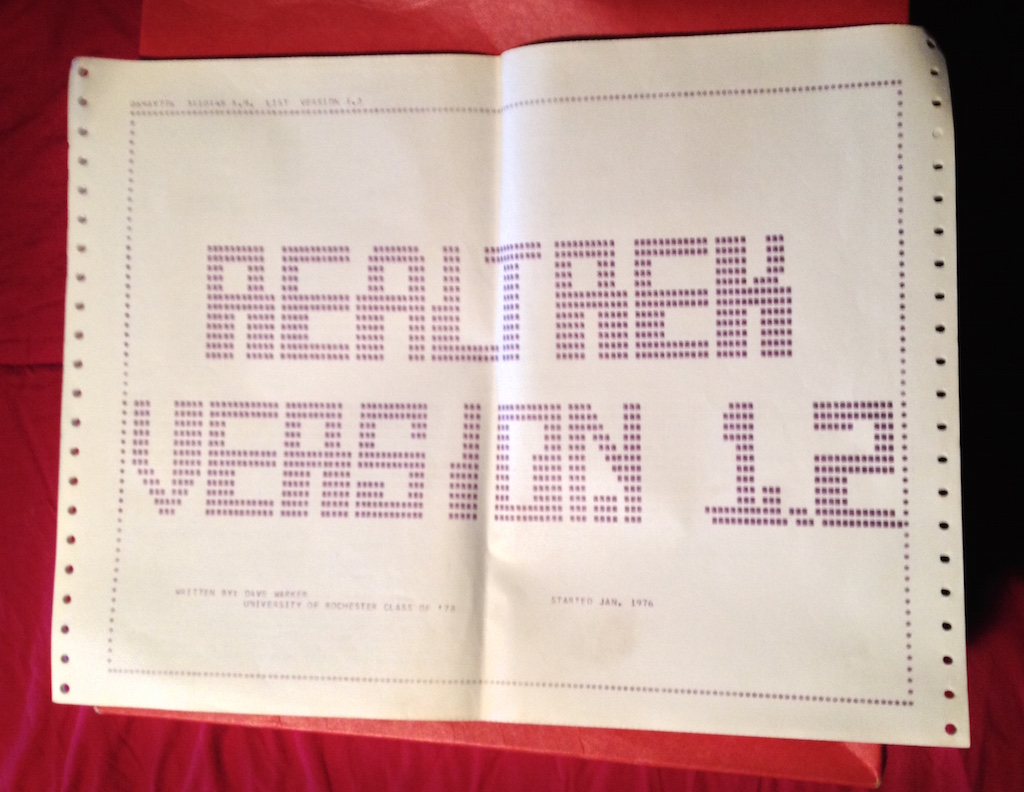
OK, so I’ve been digging through old boxes in the attic in search of things that, of course, I never did find. But what I did find was:

2014-11-14_10-27-52

Yes, it’s a full source code listing of the Star Trek game I wrote on punch cards, in FORTRAN IV, for an IBM Selectric HARD COPY terminal, connected to an IBM 360 mainframe in 1976-7 while at college.

Read the rest of this entry »

Remember? 4.6 is now available

Sunday, July 24th, 2011

Head over to the Remember? page to download version 4.6, the latest release of my reminder package and the first as a Universal (PowerPC and Intel) binary. This version also brings Mac OS X 10.7 “Lion” compatibility as well as export to iCal file format. Your existing occasion files and settings are fully compatible.

The new release requires Mac OS X 10.5 or later. Version 4.5 is still available for Mac OS 9 & Mac OS X 10.2 – 10.4 as is version 3.4 for Mac OS 8 or below.

Enjoy!

2011-Jul-26 update: Just discovered a bug in version 4.6 regarding the About window. If you open it, close it, then try to open it again the app will stop responding. I’ve got a fix but I’m holding off a bit to see if any other “issues” get reported.

Also, I’ve had one report of problems with the version 4.6 download. In particular the name is truncated at the first space to “Remember” with no file extension. I haven’t seen it here with Safari on 10.6 or 1.7 so if anyone else sees this please post a comment or email me.

2011-Aug-02 update: The issue appears to only occur if you’re using Speed Download. It truncates the downloaded file before the embedded question mark even though it’s encoded. I’ll work out a proper fix but for now there is an alternate, Speed Download friendly download link on the Remember? page.

About Remember?’s Lion Support …

Sunday, July 3rd, 2011

You know how I said the current version of Remember? was not going to make the transition to Mac OS X 10.7 a.k.a. “Lion”?

Well in the immortal words of Emily Latella “Never mind.”

I decided to take a swing at porting the existing code to Xcode, Apple’s development system, and it went surprisingly better than expected. It was compiling cleanly on Xcode in a day or two and a week of tinkering later I think all of the nasty “little versus big endian” issues have been worked out. There’s still an obscure bug or three to be tracked down but it is stable enough that I’m using it on a daily basis.

What is it?

  • This is essentially the exact same code as version 4.5 with no new features other than native code support for Intel Macs.
  • Minimum OS requirements will probably be Mac OS X 10.5 or later. I might be able to support 10.4 as well but only if there’s sufficient demand for it.
  • PowerPC Macs are still supported.
  • Existing Occasion files and your Remember? settings file work as-is on PowerPC and Intel Macs.
  • I’ll keep the current 4.5 version around for those who might need it but I won’t be fixing bugs or adding features to it.

Actually I lied, there is one significant new feature: export to iCal format. It’s one-way only, there is no iCal import and no syncing. The common date templates (single date, annual, etc.) work but many of the more obscure possibilities are not supported by iCal. When I have the time I’ll work out the specifics and the export operation will tell you if any of your occasions might be problematic.

Availability

What I have now is almost good enough for a public trial, but it fails my extended torture tests after about 20 minutes or so. When it can run them indefinitely I’ll post a beta test version for the adventurous to try. An official release will follow when any reported problems are fixed.

Apple still hasn’t given an explicit release date for Lion but the rumors are that it could happen fairly soon. I’m hoping to post the bets version in the next week but if Lion beats me out the door I’ll send a pre-beta by email request as long as you’re willing to risk global thermonuclear disaster or the occasional crash.

A Bit of Advice on Lion

Before taking the plunge and upgrading to Lion is it really important that you first make sure you aren’t dependent on any PowerPC only applications. This change is on the same order as the loss of Classic in 10.5 (?) except in this case there is no System 7 style menu bar to clue you in that you are using a Power PC app. You could be in for a rude surprise unless you prepare for the upgrade.

  1. In the Apple menu choose About this Mac then click the More Info button to open up System Profiler.

  2. Select Applications in the Software section in the left column of System Profiler. It can take a few minutes to populate the list.

  3. Widen the window so you can see the column labeled Kind. Click on it to sort your applications by the supported processor architectures.

  4. Scroll down until you find the section with a type of PowerPC. These are the applications that will not run on Lion. Well, those in the Classic section won’t either but you’ve probably already crossed that bridge unless you’re still using 10.4.

  5. Click on each PowerPC app and the Location line in the bottom section of the window will show you where it lives.

As this point the best bet is probably to launch each application and choose it’s “Check for Update” menu time if present, or visit the maker’s web site if not. If there is a free update that adds Intel or Universal support then grab it. For others you’ll have to decide if it’s worth a paid upgrade, look for alternatives that do support Intel Macs or just trash it if you don’t really need it.