June 2nd, 2019
As anyone who’s already upgraded to Mojave already knows, Apple will soon be removing support for applications that are written to use the 32 bit version of the macOS APIs (the interfaces that an app uses to communicate with the operating system.) Going forward apps must use the newer 64 bit to launch and run in macOS 10.15 and later. How does this impact Remember?
Well Remember? is currently a 32 bit API app and does not have support for 64 bit APIs. I’ve managed to drag this code base through all the other major macOS transitions (classic to Mac OS X, PowerPC processors to Intel) so I’d like to make this transition as well if for no other reason than sheer bloodymindedness. But it’s a harder job than I expected.
There are two major aspects to converting older Mac apps from 32 to 64 bit APIs: compiling the code so it executes correctly on 64 bit processors and dealing with older MacOS APIs that have been removed by Apple. It turns out the first job is the easier of the two. I’m generally careful about the kinds of things that tend to make code break when the native processor data size changes (16 bits to 32, 32 bits to 64, etc.) So with a few exceptions I don’t usually get too many surprises when compiling for a new word size.
Unfortunately, when Apple defined the 64 bit APIs they took advantange of the opportunity to do some serious housecleaning of older APIs. Pretty much all of the original MacOS APIs are gone (graphics, files, printing, etc, etc.) Bad news for me since Remember? was originally written back in the late 1980s when all of those APIs were MacOS. Replacing them with the modern 64 bit equivalents requires essentially a complete rewrite. I don’t really have a problem with that, Apple’s managed to keep them intact for 30 some years. I’ve been wanting to take a fresh look at the problem anyway but time has always been the issue.
And unfortunately it still is. I’d hoped to begin a serious look at a Remember? rewrite over the last year but professional and, more so of late, personal responsibilites have kept it on the back burner.
So here we are on the eve of Apple probably officially killing the 32 bit APIs and 64 bit Remember? is not cooking yet. I still very much want to give it a shot but I honestly can’t say when it might happen. When anything does change I’ll post the news here but for now if Remember? is still an essential tool for you upgrading to a 64 bit only macOS is not a good idea.
(A possible workaround is to run an older macOS version in a virtual machine via VirtualBox, Parallels or Fusion and run Remember? there but that’s not for the faint of heart and not something I want to try to document.)
Sorry to not have better news but I want to make sure all you existing (crazy) users who have relied on Remember? for so long know what to expect.
Dave
Posted in macosx, software |
2 Comments »
December 21st, 2017
Remember? users might want to hold off upgrading to macOS 10.13 aka “High Sierra” for now. I’ve got a few reports of Parameter Error (-50) when saving occasions that only appear to have started with the macOS upgrade. I’m going to investigate it as soon as I can but I’m not sure exactly when.
For now you might want to avoid upgrading to 10.13 if you rely on Remember?.
UPDATE: There is definitely something odd going on in High Sierra. An OS call I use to update occasions files is suddenly returning Parameter Error (-50) even though it is used correctly. My suspicion is that with the APFS file system changes made in macOS “Sierra” and “High Sierra” support for this call was broken. The call in question is an older one that’s marked as deprecated so even if it was accidental breakage it may not get fixed. I’m going to try a workaround to see if it resolves the issue.
UPDATE UPDATE: I’ve got a provisional fix for the problem but I’m still testing it. If you’ve already updated to High Sierra and need the fix ASAP send me an email at support@warker.com and I’ll shoot you the pre-release version to test.
UPDATE3:
OK, I think I’ve got it figured out. The problem isn’t with “High Sierra” specifically, it’s with Apple’s new APFS file system format introduced in “Sierra” and now supported for boot volumes in “High Sierra”. The upshot is: Macs using APFS for their boot volume require upgrading to Remember? 4.6.3 to avoid the “Parameter Error (-50)” issues. You can download the latest beta test version of it from the Remember? Page.
UPDATE4:
There might be a problem with the current 4.6.3b2 development version, I’ve gotten a report of error -39. I suspect it’s a difference between the old and new develoment system versions (GCC vs LLVM for the techie minded) that I’ll have to track down. In the meantime don’t install version 4.6.3b2.
Dave
Posted in macosx |
4 Comments »
November 14th, 2014
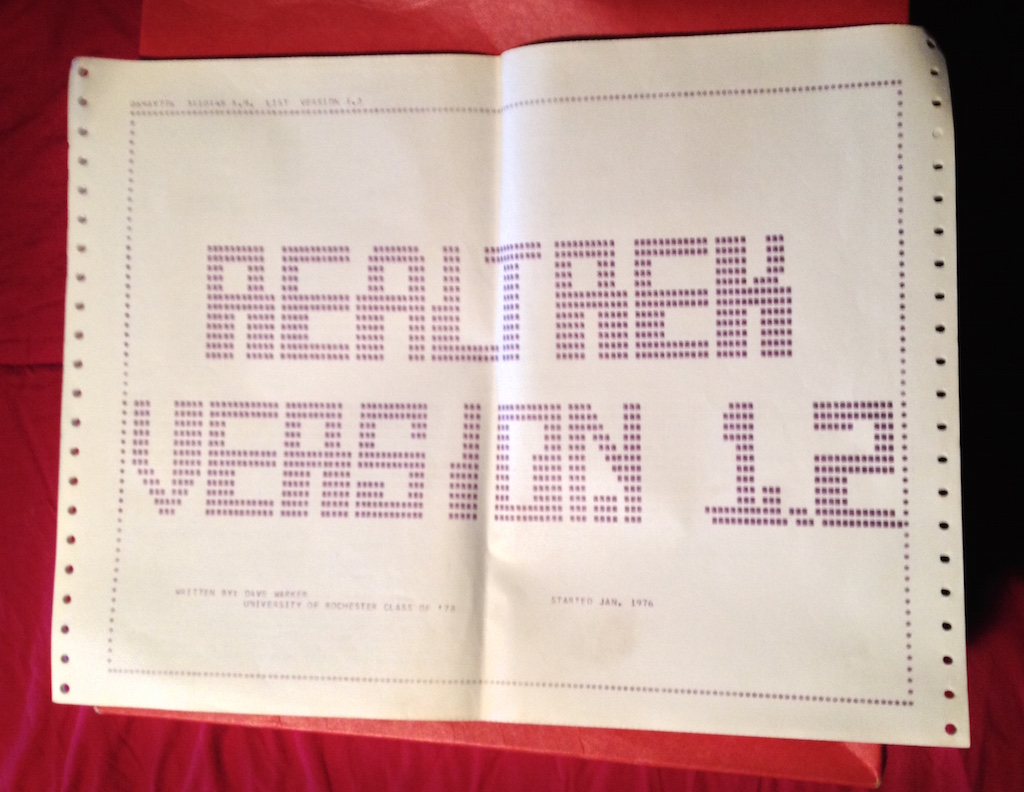
OK, so I’ve been digging through old boxes in the attic in search of things that, of course, I never did find. But what I did find was:

Yes, it’s a full source code listing of the Star Trek game I wrote on punch cards, in FORTRAN IV, for an IBM Selectric HARD COPY terminal, connected to an IBM 360 mainframe in 1976-7 while at college.
Read the rest of this entry »
Posted in etc, photos, software, vintage |
Comments Off on Attic Finds – Part 1
October 16th, 2012
Posted in etc, photos |
3 Comments »
March 6th, 2012
Just a quick thank you to Rob Ellis of Mac2MUG for presenting Remember? to his group. I’m still amazed that a little app I wrote 24 years ago is still of enough use to people that someone is willing to talk about it (even if there is no car as an incentive.)
Even with the advent of Apple Stores and Genius Bars, Macintosh User Groups (MUGs) are still the best way to learn and share what you’ve learned. If you aren’t already a member find a local MUG and join!
Posted in etc |
1 Comment »